< 60s
First Response Time
Auto-assignment rules and department routing ensure new inquiries are claimed and answered within seconds.
Unify WhatsApp customer conversations in a multi-agent shared team inbox on the Official WhatsApp Business API. Assign chats, monitor 24-hour service windows, share internal notes, and switch seamlessly between AI bots and human agents.
Multi-Agent Collaboration
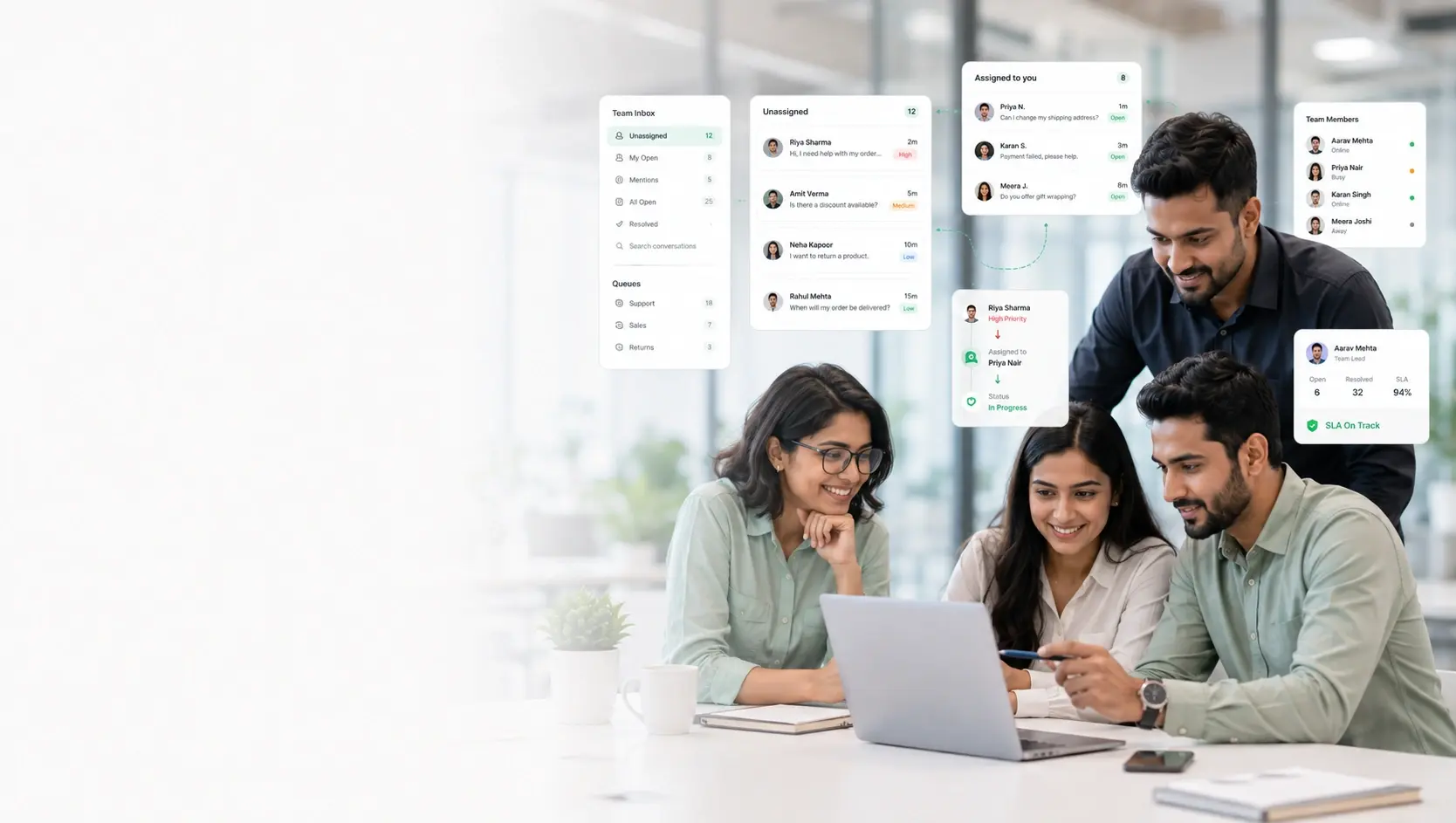
Botinx Shared Team Inbox turns your Official WhatsApp Business API number into a collaborative multi-agent support and sales workspace. Distribute incoming chats to team members by department or round-robin, track conversation priority, monitor live 24-hour Meta service window countdowns, send rich media documents and voice notes, and access canned quick replies directly from the composer. When automation needs human care, agents take over instantly with complete historical context preserved.
Auto-assignment rules and department routing ensure new inquiries are claimed and answered within seconds.
Live presence indicators show who is actively viewing and typing in a chat, preventing overlapping replies to customers.
Real-time countdown clocks alert agents to remaining window time, with 1-tap pre-approved template re-engagement when expired.
Collaborative Support & Sales
Combine human empathy with operational speed. Your team gets complete customer profiles, private internal notes, canned quick responses, and rich media sharing in one streamlined interface.
Route chats to Sales, Support, or Billing. Set priority levels (Low, Medium, High, Urgent) to address critical tickets first.
Leave internal comments on customer threads to brief teammates or document approvals without the customer seeing them.
Type ‘/’ to dispatch saved response snippets in seconds, or share PDFs, brochures, and voice notes directly with customers.
Hello! I saw your enterprise plan and want to confirm if custom webhook endpoints and Zoho Bigin sync are supported?
Checked lead record in Zoho CRM. Enterprise tier prospect. Shared architecture guide and tagged ‘Priority Sales’.
Hi Marcus! 👋 Yes, our Enterprise tier includes unlimited custom REST webhooks, full Zoho Bigin pipeline sync, and dedicated onboarding. I have attached our complete architecture guide below:
Enterprise_Architecture_Guide.pdf
1.4 MB • PDF Document
Streamlined Onboarding
From connecting your official business number to setting up department routing, empower your support team in 3 simple steps.
Link your Official WhatsApp Business API number through Meta Embedded Signup and invite your support and sales team members with role-based permissions.
Set up routing rules to automatically assign incoming chats to sales, support, or billing. Apply custom tags, set priority flags, and collaborate via private internal notes.
Reply with free-form text, voice notes, and PDF documents within the 24-hour window, or select pre-approved Meta message templates when re-engaging expired conversations.
When responding to customer inquiries within Meta’s 24-hour service window, all messages, images, PDFs, and voice notes incur zero template conversation fees. Outbound re-engagement after window expiry utilizes pre-approved Meta message templates.
Official Meta Standards
Unlike unauthorized browser extensions or QR code scrapers that risk permanent WhatsApp number bans, Botinx operates exclusively on the Official WhatsApp Business API.
Your entire team collaborates securely with role-based access, end-to-end data privacy, and full compliance with Meta’s business messaging policies.
Connect unlimited agents on a single verified WhatsApp number without disconnecting each other or violating Meta terms of service.
Prominent countdown indicators ensure agents respond promptly to inbound inquiries, taking advantage of free-form messaging without template conversation fees.
If the 24-hour service window expires, agents can select from pre-approved Meta Utility templates directly in the composer to re-open the chat cleanly.
Your Botinx platform subscription and official Meta conversation charges are billed separately. Botinx adds zero surcharge or markups to official Meta conversation rates.
Proven Team Inbox Playbooks
Discover how leading organizations in different verticals streamline multi-agent communication and customer handoffs.
Handle order inquiries, delivery status questions, and customer requests simultaneously across multiple support agents with full conversation history and instant canned responses.
View E-Commerce & D2C workflowsAssign high-intent property buyers to regional sales advisors. Agents share internal notes on buyer budget, view preferences, and schedule on-site visits with instant calendar links.
View Real Estate workflowsTriage incoming patient inquiries to specialty departments. Front-desk staff share medical reports via secure PDF viewer and coordinate doctor consultations collaboratively.
View Healthcare & Clinics workflowsSet urgent priority flags on critical client requests, reassign technical tickets to senior engineers, and maintain audit-proof conversational timelines.
View IT & Professional Services workflowsGot Questions?
Multi-agent logins, 24-hour service windows, collision prevention, and private internal notes explained.
Yes. With Botinx on the Official WhatsApp Business API, your entire team can log in from desktop or mobile and handle customer conversations concurrently on a single business phone number without disconnecting each other or risking number bans.
Every incoming customer message resets a 24-hour customer service window timer displayed prominently in the Botinx chat header. Within this window, agents can send free-form text, images, PDF documents, and voice notes without paying template conversation fees. If the window expires, agents can select a pre-approved Meta utility template to re-engage the customer.
Agents can write private internal remarks within any chat thread that are only visible to team members, not to the customer. Botinx displays who is currently assigned and active typing indicators, preventing multiple team members from responding to the same customer simultaneously.
Yes. Botinx allows one-click switching between AI automation and human agents. If a customer asks to speak with an agent, or if an automation reaches a handover node, the bot pauses and the chat is assigned to an available agent with the full previous conversation history preserved.
Agents can type '/' in the composer to access pre-saved message snippets, common answers, and onboarding links. This allows the team to respond consistently and answer routine questions in seconds without retyping.
Yes. Botinx is fully responsive across desktop browsers, tablets, and smartphones. If your number is enrolled in WhatsApp Coexistence, you can also keep the native WhatsApp Business mobile app active on the same phone number.
Inbound customer conversations that your agents answer within the 24-hour customer service window are free of business-initiated template charges. Outbound messages sent to re-engage customers outside the 24-hour window follow official Meta conversation rates (Utility, Marketing, or Authentication). Botinx passes official Meta rates directly without markups. Review Meta's current rate card for details.
Unify Your Team
Stop passing around physical phones or waiting for OTP codes. Manage customer conversations collaboratively on the Official WhatsApp Business API with Botinx.