< 15s
Instant Response Time
Engage customers immediately when they message or scan your QR code, resolving intent before competitors even check their inbox.
Design visual, multi-step customer journeys on the Official WhatsApp Business API with zero code. Connect triggers, conditions, Meta templates, interactive buttons, Shopify COD, CRMs, and live team handover.
Visual Automation & Speed
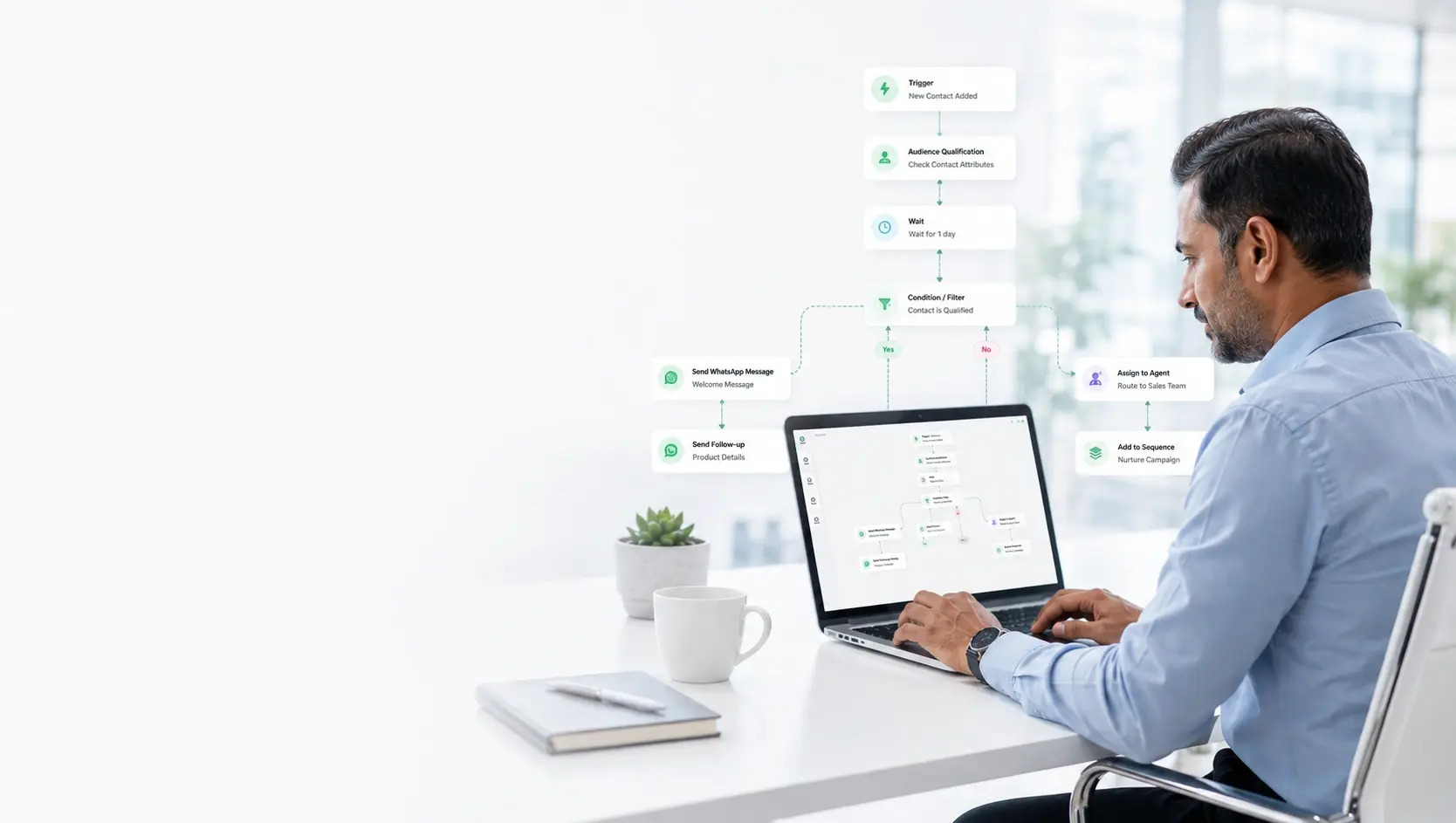
Botinx Automation Studio brings visual drag-and-drop workflow design to WhatsApp. Trigger automations from inbound keywords, website chat widgets, Shopify order events, or external REST API webhooks. Route conversations with smart conditional logic, collect structured form data, verify Cash on Delivery orders, process in-chat payments, and escalate seamlessly to live agents in the shared team inbox—all strictly aligned with Meta's 24-hour customer service window guidelines.
Instead of forcing customers through clunky web portals or making them wait hours for a support representative, Botinx enables intelligent conversational journeys directly in WhatsApp. From order verification and lead qualification to booking demos, every node executes reliably with full CRM context preserved.
Engage customers immediately when they message or scan your QR code, resolving intent before competitors even check their inbox.
Automate 1-tap Cash on Delivery confirmations in WhatsApp, tagging verified orders in Shopify and filtering out impulse purchases.
Combine interactive quick-reply menus with grounded AI agents to resolve repetitive inquiries while preserving human handover.
Interactive Workflow Studio
Botinx gives non-technical teams full creative control over conversational customer funnels. Connect triggers, dynamic templates, decision criteria routers, and enterprise apps in a single unified canvas.
Launch workflows from inbound keywords, website chat widgets, new inquiries, Shopify COD orders, or custom webhooks.
Branch flows based on contact CRM tags, order values, customer button taps, or custom fields with minute-precision delays.
Tag orders ‘COD-Confirmed’ in Shopify, create deals in Zoho Bigin, append leads to Google Sheets, or book Calendly demos.
Trigger: Orders Create • Status: Active
Customer places Cash on Delivery order on Shopify store
“Hi {{contact.name}}! Please confirm order #{{order.name}} for {{order.total}}”
Add tag "COD-Confirmed"in Shopify & notify warehouse
Cancel order in Shopify, restock inventory & alert inbox
 Botinx
Streamlined Builder Workflow
From inbound trigger to external store synchronization, deploy automated WhatsApp funnels in 3 simple steps.
Select what launches your automation: an inbound keyword (e.g. 'PRICING' or 'DEMO'), a website widget click, a new Shopify COD order, or a webhook from your CRM.
Drag and connect interactive quick-reply buttons, pre-approved Meta message templates, criteria routers, delay timers, and form inputs without writing a single line of code.
Sync customer answers into Botinx CRM, tag Shopify orders, push deals into Zoho Bigin or Google Sheets, or route VIP inquiries to live agents in the shared team inbox.
Automated responses sent within the 24-hour customer service window incur zero Meta template message fees. Outbound flows initiated outside the window utilize pre-approved Meta Utility or Marketing templates with dynamic contact variables.
Official Meta Standards
Unlike unofficial scraping tools or Android automation hacks that get your phone numbers permanently banned, Botinx operates exclusively on the Official WhatsApp Business API.
Your automations adhere strictly to Meta’s conversational policies, protecting your brand reputation, keeping phone number Quality Ratings high, and ensuring guaranteed delivery speeds.
When a customer messages your business, Meta opens a 24-hour customer service window. Inside this window, your automated workflows can send free-form text, images, quick replies, and list menus without paying template conversation fees.
For automated notifications triggered outside the 24-hour window (e.g. order tracking, shipping updates, or cart recovery), Botinx uses pre-approved Meta message templates with dynamic contact parameters.
Automations execute on Meta Cloud infrastructure with automated message throttling. Scale from 1,000 to unlimited daily conversations without risking phone number blacklisting.
Your Botinx subscription and official Meta conversation charges are billed cleanly and transparently. Botinx never adds markups or hidden fees on top of official Meta conversation rates.
Proven Automation Playbooks
Discover how leading companies in different verticals automate sales, qualification, and operations on WhatsApp.
Trigger an interactive quick-reply message immediately when an unpaid COD order is placed. When the buyer taps 'Confirm Order', Botinx automatically tags the order 'COD-Confirmed' in Shopify. If they tap 'Cancel Order', it restocks inventory and alerts fulfillment.
View E-Commerce & D2C workflowsRoute property buyer inquiries through interactive budget and preferred location menus. High-intent buyers are tagged as 'Hot Leads' and assigned to senior property advisors, while project brochures are dispatched instantly via PDF.
View Real Estate workflowsCollect student interest and academic background using conversational in-chat forms, then generate dynamic Calendly booking links for 1:1 counselor sessions with automated pre-meeting WhatsApp reminders.
View Education & EdTech workflowsGuide patients through doctor specialty selection, collect consultation preferences, and send automated confirmation reminders with clinic location pins and 1-tap reschedule options.
View Healthcare & Clinics workflowsGot Questions?
Learn how triggers, conditions, Shopify integrations, and Meta compliance guidelines operate inside Botinx Automation Studio.
When a customer sends an inbound message to your business, Meta opens a 24-hour customer service window. Within this window, your automated Botinx workflows can send free-form text, images, interactive quick replies, list menus, and WhatsApp Flows without paying template message fees. Outside the 24-hour window, workflows must use pre-approved Meta Utility or Marketing templates to initiate contact.
Botinx connects directly to your Shopify store via official webhooks. When an order is created with COD payment, Botinx triggers an automated WhatsApp message with interactive 'Confirm Order' and 'Cancel Order' buttons. Customer responses instantly update Shopify order tags (e.g. 'COD-Confirmed'), cancel fake orders automatically, and notify your fulfillment team, reducing RTO (Return to Origin) by up to 35%.
Yes. You can place an 'Assign To Team Member' or 'Human Handover' node at any branch in your workflow. When triggered (by button choice, keyword like 'Talk to Agent', or conditional rule), the bot pauses, and the conversation is routed directly into the Botinx Shared Team Inbox with complete conversational history preserved.
Botinx provides native, out-of-the-box automation nodes for Shopify (draft orders, confirmed orders, order tagging, cancellation, fulfillment), WooCommerce (order status, meta updates, notes), Zoho CRM & Zoho Bigin (contacts, leads, deal stages), Google Sheets (append row), Calendly (meeting scheduling, reminders), Stripe & Razorpay (dynamic payment links), and generic REST API webhooks.
Yes. Botinx includes dedicated 'Collect User Inputs' nodes and native 'WhatsApp Flows'. You can ask questions sequentially (e.g. name, email, city, order number), validate input formats automatically, and map customer responses directly into custom CRM contact fields or external spreadsheets.
Botinx operates 100% on the Official WhatsApp Business API. Your automations never risk phone number bans unlike unofficial Chrome extensions or scrapers. Messaging limits scale according to official Meta messaging tiers (Tier 1 to Unlimited), and Botinx includes built-in rate pacing to keep your phone number Quality Rating high.
Messages sent within the 24-hour customer service window in response to user inquiries are not charged as business-initiated templates. Outbound messages that initiate a flow outside the 24-hour window follow official Meta conversation rates (Marketing, Utility, or Service categories). Botinx passes official Meta rates directly without markups. Review Meta's current rate card for your regional currency.
Put Your WhatsApp on Autopilot
Deploy your first visual workflow in minutes. Connect your Shopify store, CRM, or website widgets and engage leads in under 15 seconds with the Official WhatsApp Business API.